Frame-by-frame lip sync

Create lip-sync animations from mouth PNGs and audio

Upload your own mouth drawings, add a voice track, preview the timing, and export a ready-to-use animation.

No AI art generation — just your own mouth drawings, animated.
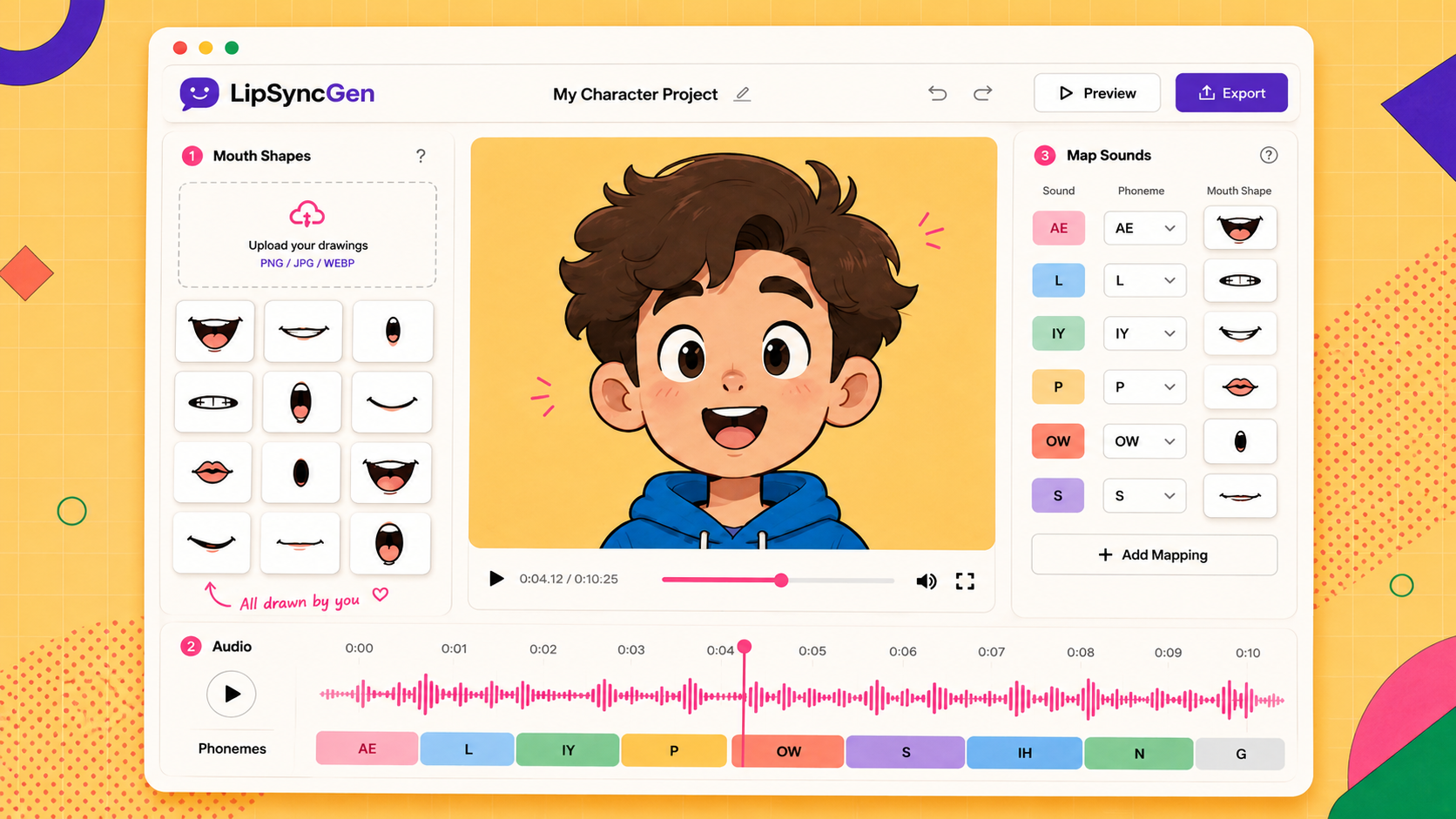
LipSyncGen interface showing mouth shapes, audio timeline, mapping, preview, and export controls

Three simple steps

No video editing skills needed — just your character's mouth shapes and a voice recording.

Step 01
🖼️
Upload mouth shapes

Use transparent PNGs that are aligned to the same character position. Name them by sound (ah.png, mm.png, etc.).

Step 02
🎙️
Add your audio

The app listens to the audio and suggests mouth timing automatically, so you can stay focused on the character.

Step 03
🎬
Preview and export

Check the animation, adjust the sound-to-mouth mapping if needed, and download a green screen MP4 or transparent MOV.

Create your animation

A clean workspace for your drawings, audio, timing, mapping, preview, and export.

My Character Project ✏️
1 Mouth Shapes
Name files by sound:
ah.png, mm.png, ee.png, oh.png, oo.png, pp.png, ff.png, ss.png, ch.png, nn.png, rest.png

Each PNG should be transparent, with the mouth at the same position on every frame.

✦ All drawn by you ♡
Upload your drawings
PNG / GIF / WEBP
Speaks:
Drag & Drop mouth shapes and audio here,
or use the panels — then click ⚡ Analyze
Upload files to begin
FPS
2 Audio
🎙 Drop audio or click MP3 / WAV / OGG
0.0s / 0.0s
Analyze audio to see the phoneme timeline
3 Map Sounds
Click any row to edit which sounds a mouth shape represents.

One mouth can cover multiple sounds — e.g. M and N can share the same closed-mouth shape.
Sound Name Shape
Upload mouth shapes to see mapping
Export
MP4
Green screen
Chroma key — Premiere, Resolve
Run analysis first

Which sounds does this mouth make?

File:

Toggle all the sounds this mouth shape represents. You can select multiple.
↺ Reset to auto-detection